Discord Font Generator
Get Discord fonts like 𝐛𝐨𝐥𝐝, 𝖌𝖔𝖙𝖍𝖎𝖈, ꜱᴍᴀʟʟ ᴄᴀᴘꜱ and 𝓬𝓾𝓻𝓼𝓲𝓿𝓮 for your display name, roles and server. Type below, copy the Discord font you like and paste it into Discord. No Nitro needed.
How to Use Discord Fonts
Type your text
Enter a display name, a role, a server name or a message in the box above. This Discord font generator, which also works as a Discord text generator, turns it into every style at once.
Pick a Discord font
Tap Copy on the style you like. For Discord name fonts, bold, small caps and gothic read well in a busy member list.
Paste it in Discord
Paste into your display name, server nickname, About Me, a role or a message. No bot, no Nitro and no app needed.
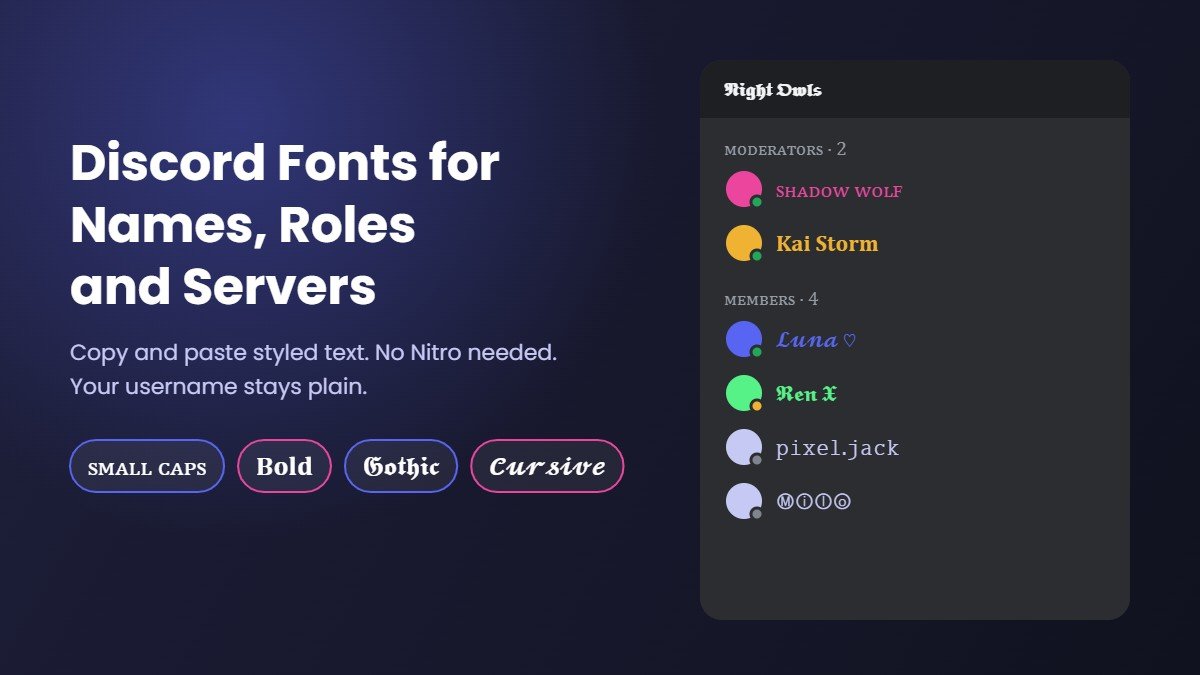
Where Discord Fonts Work
Discord fonts from this page are Unicode characters, not real font files, which is why Discord fonts copy and paste so easily. They show up wherever Discord accepts special characters. Here is where your Discord text and Discord text fonts will work, field by field:
| Place in Discord | Do fonts work? | What to know |
|---|---|---|
| Username | No | Usernames only allow lowercase letters, numbers, underscores and periods, so Discord username fonts are rejected. Use your display name instead. |
| Display name | Yes | The main spot for a Discord name font. It can be up to 32 characters, and long styled names may be cut short on mobile. |
| Server nickname | Yes | Set a different Discord font name in each server. Some servers ask members to keep nicknames readable, so check the rules. |
| About Me | Yes | Great for a styled line or two. The bio is limited to 190 characters. |
| Role names | Yes | Popular for staff roles like ᴍᴏᴅᴇʀᴀᴛᴏʀꜱ or 𝐀𝐝𝐦𝐢𝐧. Unicode characters are allowed in role names. |
| Channel names | Sometimes | Discord forces channel names to lowercase and turns spaces into hyphens. Some Discord channel fonts work, others are removed, so test one channel first. |
| Server name | Yes | A styled server name like 𝕹𝖎𝖌𝖍𝖙 𝕺𝖜𝖑𝖘 stands out in the server list. |
| Messages | Yes | Paste styled words into chat, or use Discord font commands for bold and italic. |
Discord Font Styles With Examples
These are the fonts for Discord that people use most, shown as a display name and a role. Think of it as a quick font for Discord preview before you copy anything. Tap any example to select it, or type your own words in the font generator for Discord above.
| Style | Display name | Role or channel |
|---|---|---|
| Small caps | ꜱʜᴀᴅᴏᴡ ᴡᴏʟꜰ | ᴍᴏᴅᴇʀᴀᴛᴏʀꜱ |
| Bold | 𝐒𝐡𝐚𝐝𝐨𝐰 𝐖𝐨𝐥𝐟 | 𝐌𝐨𝐝𝐞𝐫𝐚𝐭𝐨𝐫𝐬 |
| Sans bold | 𝗦𝗵𝗮𝗱𝗼𝘄 𝗪𝗼𝗹𝗳 | 𝗮𝗻𝗻𝗼𝘂𝗻𝗰𝗲𝗺𝗲𝗻𝘁𝘀 |
| Gothic | 𝕾𝖍𝖆𝖉𝖔𝖜 𝖂𝖔𝖑𝖋 | 𝕹𝖎𝖌𝖍𝖙 𝕺𝖜𝖑𝖘 |
| Cursive | 𝓢𝓱𝓪𝓭𝓸𝔀 𝓦𝓸𝓵𝓯 | 𝓻𝓾𝓵𝓮𝓼 |
| Monospace | 𝚂𝚑𝚊𝚍𝚘𝚠 𝚆𝚘𝚕𝚏 | 𝚐𝚐 𝚎𝚣 |
| Bubble | Ⓢⓗⓐⓓⓞⓦ Ⓦⓞⓛⓕ | ⓡⓤⓛⓔⓢ |
Gamers often go for cool fonts for Discord such as gothic or the edgy glitch text, while art and study servers lean on soft aesthetic fonts and cursive. For Discord fancy text with frames and symbols, try the fancy text generator, and for a quick bold role name, the bold text generator is the fastest option. If you want even more choice, the main font generator has 1,600+ styles. Every result is Discord copy and paste ready, whether you want fancy Discord text for a role or plain bold for a name.
How to Change Your Font on Discord
Discord has no setting to change the font of your messages for everyone, so a Discord font change for your name works by pasting styled text. If you are wondering how to change font on Discord, or how to change Discord name font settings on desktop or mobile, these are the steps:
- Copy a style from this Discord font changer.
- Open User Settings and go to Profiles.
- Paste it into Display Name and save.
- To use a different Discord name font in one server only, open that server's menu, choose Edit Server Profile and paste it as your nickname.
Keep one plain word in your name if you can, for example "Wolf | 𝕾𝖍𝖆𝖉𝖔𝖜". Friends search for you with normal letters, and fully styled names are harder to find.
Changing the font you see in the app
If you are asking how to change font in Discord for your own screen, that is a different setting. Under User Settings > Appearance you can change the chat font scaling and message spacing. That only changes how Discord looks to you, not the font other people see.
Discord Font Commands
Discord font commands (often searched as Discord fonts commands) are markdown codes you type around your words. They only work in messages, but they are handy next to Unicode fonts:
| Type this | You get |
|---|---|
**text** | Bold |
*text* | Italic |
__text__ | Underline |
~~text~~ | Strikethrough |
# text | Big header |
-# text | Small grey subtext |
`text` | Code font |
Markdown does not work in display names, roles or channel names, which is where Unicode Discord fonts come in. For tiny text in chat and in names, see our full guide to small text in Discord. To make tiny letters for any app, use the small text generator.
What Font Does Discord Use?
Discord uses its own typeface called gg sans for chat and the interface. It replaced Whitney, the Discord font used for years before. So if you are wondering what font does Discord use for text in messages, the answer is gg sans, and the default Discord font cannot be changed for other people.
You cannot download gg sans as a free font for your own projects. If you want your Discord text to look different, the only way that works for everyone is Unicode fonts like the ones on this page. That is also the real answer to how to change Discord font for other people to see.
Free Discord Fonts vs Nitro Display Name Styles
Discord now has its own paid font feature called Display Name Styles. Nitro members can pick one of 12 fonts, including Tempo, Sakura, Jellybean, Medieval, 8Bit and Vampyre, plus effects like Gradient and Neon and custom colors. Without Nitro you can preview them but not save them.
The Discord fonts in this generator are different and free. They are Unicode text, so they work without Nitro, in more places (roles, server names, About Me and messages), and every Discord font copy and paste result works for your friends too. The trade off is that Unicode letters are made of special characters, so they are less searchable than plain text.
Invisible Discord Name
An invisible Discord name (people also search discord invisible name or invisible name discord), also called a blank Discord name, uses a character that looks like empty space. Your username cannot be blank, but your display name and server nickname can look empty. The two characters people use most are the Hangul Filler and the Braille blank. Copy one from the box below and paste it into Display Name:
Discord sometimes trims characters it treats as plain spaces, so if one does not save, try the other. Note that some servers do not allow invisible names, because moderators need to see who is talking.
Tips and Common Problems
- Boxes instead of letters. Older phones may lack a few characters and show □. Bold, small caps and gothic are the safest Discord fonts.
- Mentions are harder. People type @ and plain letters to mention you. A fully styled display name can make that awkward, so keep part of it plain.
- Screen readers. Assistive tools may read styled letters one by one, so keep server rules and announcements in normal text.
- Need a new name first? Our username generator suggests names, and our guide to your name in different fonts shows names in 16 styles.
- Same look everywhere. These fonts also work in other apps, so you can match your Discord, TikTok fonts and Instagram fonts.
More Free Font Tools
Frequently Asked Questions
Find answers about the Discord Font Generator