TikTok Font Generator
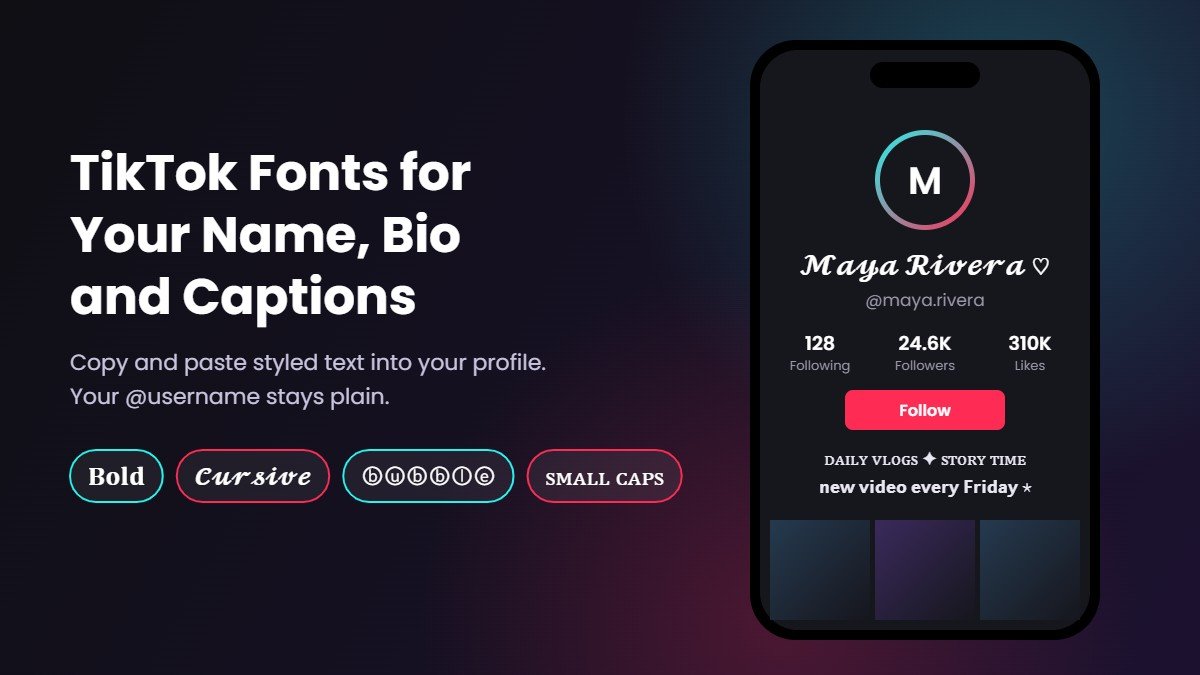
Turn your TikTok name, bio and captions into 𝐛𝐨𝐥𝐝, 𝓬𝓾𝓻𝓼𝓲𝓿𝓮, ⓑⓤⓑⓑⓛⓔ or ꜱᴍᴀʟʟ ᴄᴀᴘꜱ text. Type below, copy the TikTok font you like and paste it straight into the app.
How to Use TikTok Fonts
Type your text
Write your name, a bio line or a caption in the box above. This font generator for TikTok updates every style as you type.
Pick a style
Scroll the results and tap Copy on the one you like. Bold, cursive and small caps are the most readable fonts for TikTok on a phone screen. Need even more choice? The main font generator has 1,600+ styles.
Paste it in TikTok
Open your profile, tap Edit profile and paste into Name or Bio. You can also paste into captions and comments.
Where TikTok Fonts Work (and Where They Don't)
These are not real fonts. Each styled letter is a Unicode character, the same kind of text as an emoji (you can see every letter in our alphabet in different fonts guide), so TikTok shows these TikTok letters as long as that field accepts special characters. Most fields do. One important field does not, which is why so many people ask how to get a font username on TikTok and end up disappointed.
| Place in TikTok | Do fonts work? | What to know |
|---|---|---|
| Username (@handle) | No | Usernames only accept letters, numbers, underscores and periods, so TikTok username fonts and other TikTok special characters will be rejected. Style your Name instead. |
| Name | Yes | The best spot for a TikTok name font or a TikTok stylish name. It shows at the top of your profile and next to your comments. |
| Bio | Yes | A TikTok bio font works well for one or two words. The bio has an 80 character limit, and styled letters can use more of it than plain ones. |
| Video captions | Yes | A TikTok caption font makes a great hook, but keep hashtags plain so they still link and stay searchable. |
| Comments | Yes | Paste a short styled reply to stand out in a busy comment section. |
| Text on the video | Partly | The in-app text tool has its own styles. Pasted Unicode text often works there too, but test it before you post. |
TikTok Font Styles With Examples
Here is how the same profile text looks in the TikTok fonts people use most, from cool fonts for TikTok edits to cute fonts for TikTok bios. Every example is TikTok fonts copy and paste ready: tap one to select it, or type your own words in the generator above.
| Style | Name example | Bio or caption example |
|---|---|---|
| Bold | 𝐌𝐚𝐲𝐚 𝐑𝐢𝐯𝐞𝐫𝐚 | 𝐧𝐞𝐰 𝐯𝐢𝐝𝐞𝐨 𝐞𝐯𝐞𝐫𝐲 𝐅𝐫𝐢𝐝𝐚𝐲 |
| Sans bold | 𝗠𝗮𝘆𝗮 𝗥𝗶𝘃𝗲𝗿𝗮 | 𝗦𝘁𝗼𝗿𝘆 𝘁𝗶𝗺𝗲 𝗣𝗮𝗿𝘁 2 |
| Cursive | 𝓜𝓪𝔂𝓪 𝓡𝓲𝓿𝓮𝓻𝓪 | 𝓭𝓪𝓲𝓵𝔂 𝓿𝓵𝓸𝓰𝓼 ♡ |
| Bubble | Ⓜⓐⓨⓐ Ⓡⓘⓥⓔⓡⓐ | ⓓⓐⓝⓒⓔ ⓥⓘⓓⓔⓞⓢ |
| Small caps | ᴍᴀʏᴀ ʀɪᴠᴇʀᴀ | ᴅᴀɪʟʏ ᴠʟᴏɢꜱ ✦ ꜱᴛᴏʀʏ ᴛɪᴍᴇ |
| Double struck | 𝕄𝕒𝕪𝕒 ℝ𝕚𝕧𝕖𝕣𝕒 | 𝕝𝕚𝕟𝕜 𝕓𝕖𝕝𝕠𝕨 |
The TikTok cursive font is the most popular choice for names, while bold text suits creators who want a clean, confident TikTok name style. For a more decorated look, the fancy text generator and stylish text generator add symbols and frames around your words. Want one look in more depth? The cursive font generator has every script style, the bubble font generator covers circled letters, and the glitch text generator makes the messy, edgy text that suits edit accounts. For a softer bio, try the aesthetic font generator.
How to Change the Font on TikTok
TikTok has no font setting for your profile, so the only way to change the font on TikTok for your name or bio is to paste styled text. Think of this page as your TikTok font changer. Here is the full TikTok font change, step by step:
- Copy a style from the TikTok font generator above.
- Open TikTok and go to your Profile.
- Tap Edit profile.
- Tap Name or Bio, delete the old text and paste the new one.
- Tap Save.
TikTok also limits how often you can change your name, so pick a style you are happy with before you save. A good habit is to keep part of your name plain, for example "Maya | 𝓭𝓪𝓷𝓬𝓮", because people search for you by normal letters.
Making the most of 80 characters
The TikTok bio character limit is 80. Many styled letters are stored as two units of text behind the scenes, so a fully styled bio can hit the limit sooner than you expect. Style one or two key words, keep the rest plain, and use a symbol as a divider instead of extra words.
What Font Does TikTok Use?
What is the TikTok font? If you are asking what font TikTok uses in the app itself, the answer is TikTok Sans, the company's own typeface, which you can find on Google Fonts. Before it, the TikTok logo font and interface were based on Proxima Nova, a commercial sans serif by Mark Simonson. You will sometimes see it written as the Tik Tok font, but it is the same thing.
If you want to know what font TikTok uses for text on videos, that is a different tool. The text tool you see while editing a video is separate. It offers a handful of built in styles, such as Classic, Typewriter, Handwriting, Neon and Serif, and those styles only appear on the video. They cannot be copied into your bio or name. That is why creators use a TikTok text generator like this one for profile text, and the in-app tool for words on the video. A TikTok text font from the generator works in places the video tool cannot reach.
So if you want the official TikTok font name for a design project, look up TikTok Sans. If you want fancy text for your TikTok profile, use the styles above.
Invisible and Blank TikTok Names
A lot of people search for an invisible username on TikTok, or for invisible text for TikTok names. It is worth knowing that a blank username is not possible, because the @handle only accepts letters, numbers, underscores and periods. What people actually make invisible is the Name.
The usual trick is the Hangul Filler character, which looks like an empty space. Copy it from the box below and paste it into your Name field:
TikTok sometimes changes which characters it accepts, so if the app refuses it, add a small symbol such as ⋆ or ♡ instead. A name that is almost empty still looks clean, and it is easier for followers to tap.
TikTok Bio Symbols to Copy and Paste
Symbols are the easiest way to make a TikTok bio look finished without using many characters. These all paste cleanly next to TikTok bio fonts, so treat this as a TikTok bio copy and paste kit:
A simple pattern that works: one styled word, one symbol, one plain phrase. For example "ᴅᴀɪʟʏ ᴠʟᴏɢꜱ ✦ new video every Friday ↓". If you want more ideas for the name itself, our guide to your name in different fonts shows names in 16 styles, and the username generator helps when you need a new handle.
Tips and Common Problems
- Boxes instead of letters. Some older phones lack a few characters and show □. Bold, cursive, bubble and small caps are the safest TikTok fonts across devices.
- People cannot find you. TikTok search reads 𝓜𝓪𝔂𝓪 and Maya as different words. Keep your username plain and leave one plain word in your Name.
- Screen readers. Assistive apps may read styled letters one by one, so keep important information, like a link or a brand name, in normal text.
- Hashtags stop working. A hashtag written in a fancy font is no longer the same tag. Write hashtags in plain letters.
- Same style everywhere. These fonts also work on other apps, so you can match your TikTok, Instagram, Facebook and Discord fonts for a consistent look.
More Free Font Tools
Frequently Asked Questions
Find answers about the TikTok Font Generator