Small Text Generator
Turn any text into tiny text like ˢᵐᵃˡˡ ᵗᵉˣᵗ, ₛₘₐₗₗ ₜₑₓₜ and ꜱᴍᴀʟʟ ᴛᴇxᴛ. This free small text generator makes superscript, subscript and small caps letters you can copy and paste anywhere.
How to Use the Small Text Generator
Type your text
Write a word, a name or a short line in the box above. The small text generator turns it into tiny text the moment you type.
Pick a small font
Choose superscript (ˢᵐᵃˡˡ), subscript (ₛₘₐₗₗ) or small caps (ꜱᴍᴀʟʟ). Each one gives a different kind of tiny look.
Copy and paste
Tap Copy and paste your small text into a bio, a caption, a username or a message. Small text copy and paste works like normal text, so there is nothing to install.
What Is Small Text?
Small text is normal writing turned into tiny letters that you can copy and paste anywhere. People call it tiny text, mini text, little text or small letters, but it all means the same thing: letters that look smaller than regular text without changing any font size setting.
A small text generator does not shrink a font. It swaps each letter for a Unicode character that is already small, such as the superscript ᵃ or the small capital ᴀ. Because these are real characters, they stay tiny when you paste them into Instagram, TikTok, WhatsApp, X or a game, where you normally cannot change the text size at all.
Small Text Styles: Superscript, Subscript and Small Caps
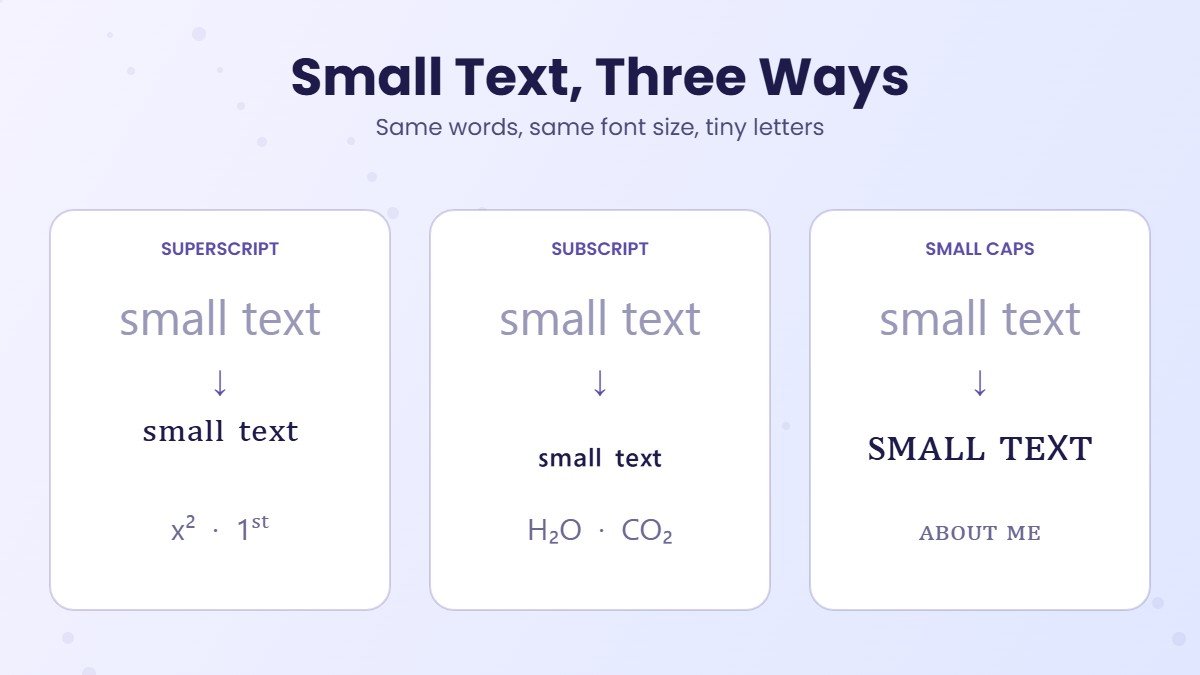
There are three kinds of small font you can copy and paste. Whichever small text font you choose, whether you call it a small letters font, a small letter font, a tiny letter font or tiny letters font, it comes from one of these three sets of tiny characters:
| Style | Example | Looks like | Best for |
|---|---|---|---|
| Superscript | ˢᵐᵃˡˡ ᵗᵉˣᵗ | Tiny letters that sit high | Short tags, footnotes, x², cute bios |
| Subscript | ₛₘₐₗₗ ₜₑₓₜ | Tiny letters that sit low | Numbers and formulas like H₂O |
| Small caps | ꜱᴍᴀʟʟ ᴛᴇxᴛ | Capital shapes at lowercase size | Names, headings, clean aesthetic bios |
Superscript is the classic tiny text font most people picture. Small caps reads the most clearly, which is why many people pick it for a display name. If you only need small caps, the small caps generator has more options, and our aesthetic font generator pairs it with soft symbols for a minimal look.
Superscript Generator: Small Letters A to Z
This small text generator also works as a superscript generator. Here is every superscript letter and number in one place, ready for small letters copy and paste (or tiny letters copy and paste, if that is what you searched). Copy a single small letter or the whole set of tiny letters:
Unicode has no true superscript q, so the superscript text generator uses the look alike ᑫ. A few capitals, such as C, F, S, X, Y and Z, also borrow the small lowercase shape, because Unicode never added superscript versions of them. The result still reads as tiny letters, and you can see how these characters compare with other styles in our alphabet in different fonts guide.
Subscript Generator: Tiny Letters That Sit Low
Subscript text sits below the line, like the 2 in H₂O. Use this subscript generator (some people search for a subscript text generator) for chemistry, math and small notes. These are the subscript characters that exist:
Subscript is the weakest style for words, because Unicode has no subscript b, c, d, f, g, q, w, y or z. Those letters stay full size, so "tiny text" turns into ₜᵢₙy ₜₑₓₜ. For whole words, superscript or small caps look neater. For numbers, subscript is perfect.
Small Numbers Copy and Paste
Every digit has a tiny version in both styles, which makes small numbers the most reliable part of any small text set. Here is a small number font in two versions, with tiny numbers copy and paste ready:
| Type | Small numbers | Common uses |
|---|---|---|
| Superscript numbers | ⁰ ¹ ² ³ ⁴ ⁵ ⁶ ⁷ ⁸ ⁹ | x², m³, footnotes¹, 1ˢᵗ place, dates like 25ᵗʰ |
| Subscript numbers | ₀ ₁ ₂ ₃ ₄ ₅ ₆ ₇ ₈ ₉ | H₂O, CO₂, log₁₀, version tags like ᵥ₂ |
Small Letters, Tiny Text and Mini Fonts: Same Thing?
Mostly, yes. Searches for a tiny text generator, a small font generator, a tiny font generator, a tiny letter generator, a small letter generator, a mini text tool or a little text generator all lead to the same idea: turning normal words into small characters, also called tiny characters. Other names you will see include small text maker, tiny text maker, small font maker, tiny generator, super small text generator and extremely small font generator. The names just come from different apps and communities.
- Small letters or tiny letters usually means superscript, like ᵗⁱⁿʸ ˡᵉᵗᵗᵉʳˢ.
- Small font, tiny font or tiny fonts is the same text described as a font, even though no font file is involved. You will also see it written as small font text or a tiny text font, and sometimes simply as font small.
- Mini font, mini text and little font are casual names people use for small caps or superscript.
- Small words or tiny words simply means a full phrase written in small text, such as ˢᵉᵉ ʸᵒᵘ ˢᵒᵒⁿ. That is why tools are sometimes called a small word generator, a small words generator or a tiny word generator.
Whatever you call it, the small text generator above handles all of them, from a single tiny letter to a whole line of small words.
Where to Use Small Text
- Instagram and TikTok bios. A small font style line like ᵈᵃⁱˡʸ ᵛˡᵒᵍˢ under your name looks tidy and saves visual space. See our Instagram fonts and TikTok fonts for more ideas.
- Discord. Tiny text works in display names and nicknames, while messages also have the built in
-#subtext. Our guide to small text in Discord covers both, and the Discord font generator has more styles for servers. - Usernames and gamer tags. Small caps names like ᴠᴏʀᴛᴇx stay readable in lobbies and leaderboards. Need a name first? Try our username generator.
- Math, science and dates. x², H₂O, 10³ and 4ᵗʰ of July look correct without any formatting menu.
- Notes and jokes. Tiny text is perfect for a whispered aside like ᵗʰⁱˢ ⁱˢ ᶠⁱⁿᵉ.
How to Make Text Smaller in Docs and Word
If you want to make text smaller inside a document, you do not need a text shrinker at all. Word processors have their own superscript and subscript shortcuts:
| App | Superscript | Subscript |
|---|---|---|
| Microsoft Word | Ctrl + Shift + = | Ctrl + = |
| Google Docs | Ctrl + . | Ctrl + , |
On a Mac, use Cmd instead of Ctrl. These shortcuts only work inside that document. When you copy the text into a social app, the formatting disappears, which is exactly the problem a small text converter solves: Unicode tiny text keeps its size everywhere.
Small Font Style Ideas to Copy
Pair small text with symbols or a second style for a finished look. Each idea below is small font style copy paste ready:
| Idea | Example |
|---|---|
| Soft bio line | ♡ ˢᵗᵃʸ ᵏⁱⁿᵈ ♡ |
| Name with tag | Maya ᵒᶠᶠⁱᶜⁱᵃˡ |
| Clean heading | ᴀʙᴏᴜᴛ ᴍᴇ |
| Gamer tag | ᴠᴏʀᴛᴇx ᵍᵍ |
| Cursive with tiny note | 𝓛𝓾𝓷𝓪 ˢᵗᵘᵈⁱᵒ |
There is no true small cursive font in Unicode, but mixing a cursive word with superscript, like the last example, gives a similar feel. For more pairings, the cute font generator and the main font generator with 1,600+ styles are good next stops.
Tips and Common Problems
- Some letters stay big. That is a Unicode gap, not a bug. Subscript misses nine letters, and superscript uses ᑫ for q. Switch to superscript or small caps for full words.
- Boxes instead of letters. A few older phones lack rare characters and show □. Superscript and small caps are the safest small fonts.
- Hard to read. Tiny text is great for a tag or a short line, not a paragraph. Keep important details in normal text.
- Copying from other sites. Small font copy paste from random pages can bring hidden characters along. Generating fresh small fonts copy and paste text here, or tiny text copy and paste from the tables above, keeps it clean. The same goes for tiny font copy and paste in names, where an extra space can break the look.
- Search and screen readers. Search tools and assistive apps may not read small letters as normal words, so keep your real name and key info plain.
More Free Font Tools
Frequently Asked Questions
Find answers about the Small Text Generator